Category Archives: AI and Machine Learning

Ollama: A Flexible Solution for Custom Machine Learning Models

Ollma image generated using AI

Ollama is an open-source platform designed for training and deploying custom machine-learning models locally. It enables users to work without relying on cloud services. It supports various model architectures, offering flexibility for diverse applications. Ideal for researchers and developers seeking privacy and control over their data, it facilitates offline AI development and experimentation. (This paragraph was written using the deepseek-r1:32b model running on an Apple Mac Mini M4 Pro).

We will use Ollama as a core tool to experiment with Large Language Models running locally on our LLM Workstation.

Installing and Running the Tool

You can install Ollama by downloading and running the installer. Next, you can choose a model (ex. llama3.2) and execute the following command to install and run it.

% ollama run llama3.2

We’ll ask the model to write a paragraph about large language models.
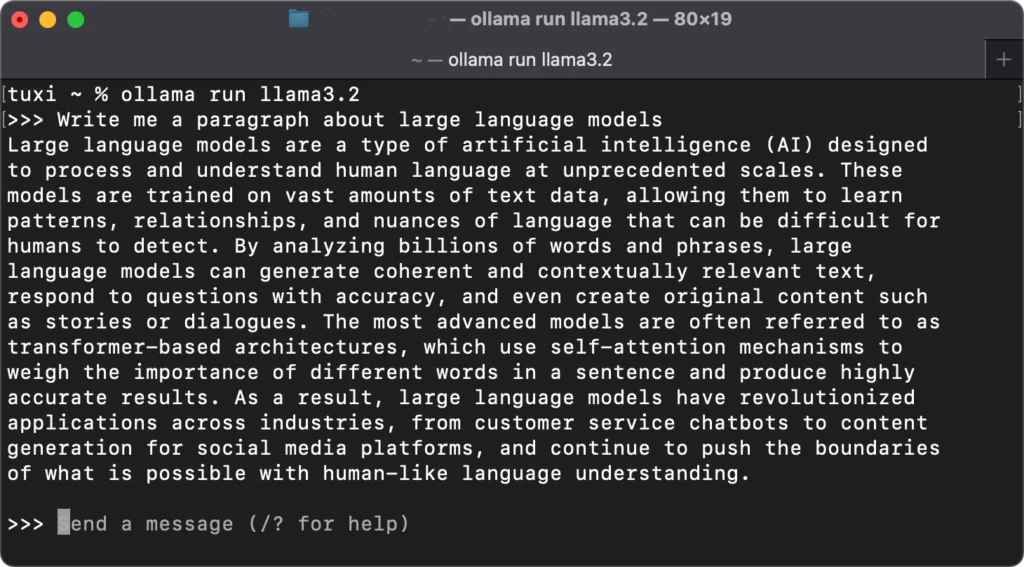
Ollama running the llama3.2 model

Commands to control the model process are entered by starting with a /. Here is a list of options.
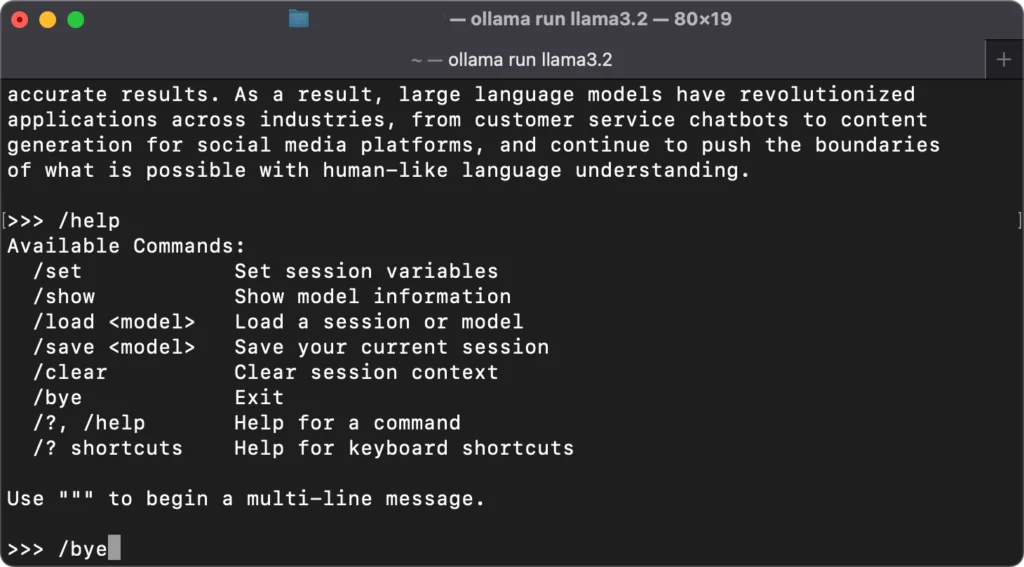
Ollama commands

Exposing Ollama on Our Network

An API that enables applications to interact with or change the running model is available on http://localhost:11434. We want to make the API accessible across our network. We can create a plist to set the OLLAMA_HOST environment variable to “0.0.0.0:11434” to expose the API on our workstation’s IP interface. The list file should be created and saved in ~/Library/LaunchAgents. It is named com.ollama.plist. The plist’s contents are shown below.

XML
<?xml version="1.0" encoding="UTF-8"?>
<!DOCTYPE plist PUBLIC "-//Apple//DTD PLIST 1.0//EN" "http://www.apple.com/DTDs/PropertyList-1.0.dtd">
<plist version="1.0">
<dict>
    <key>Label</key>
    <string>com.ollama</string>
    <key>Program</key>
    <string>/Applications/Ollama.app/Contents/MacOS/Ollama</string>
    <key>EnvironmentVariables</key>
    <dict>
        <key>OLLAMA_HOST</key>
        <string>0.0.0.0:11434</string>
    </dict>
    <key>RunAtLoad</key>
    <true/>
    <key>KeepAlive</key>
    <true/>
</dict>
</plist>
Ollama com.ollama.plist contents

Finally, make sure that Ollama is stopped and run the following command. Then restart Ollama.

% launchctl load ~/Library/LaunchAgents/com.ollama.plist

You can now access the API anywhere on your network as http://<your workstation IP>:11434.

Building an LLM Workstation Using Apple Silicon

LLM Workstation using Apple Silicon

We are building a Large Language Model (LLM) workstation and server around a Mac Computer and Apple Silicon. My current machine is a Mac Mini M4 Pro. The specs for this machine are –

  • M4 Pro Chip
  • 48 GB of Unified Memory
  • 16 CPU Cores
  • 20 GPU Cores
  • 16-Core Neural Engine
  • 2 TB SSD Storage

We have a new Mac Studio M3 Ultra coming. This upgrade should give us considerably more processing power for my LLM Workstation. The specs for the new machine are –

  • M3 Ultra Chip
  • 512 GB of Unified Memory
  • 32 CPU Cores
  • 80 GPU Cores
  • 32-Core Neural Engine
  • 2 TB SSD Storage
  • 5 TB external Thunderbolt 5 SSD Storage

The setup has a pair of Apple 5K Studio Displays. They allow me to use it as my primary desktop machine.

Our LLM Workstation is a good platform for learning about Artificial Intelligence and Machine Learning. It is also suitable for learning about Machine learning and our planned AI projects.

We will set up our Workstation to run LLMs continuously. We will expose these LLMs via our Home Network. A web (Open WebUI) interface will connect them to other computers and smart devices around our home. Our current Docker setup will be used for this purpose.

Artificial Intelligence and Machine Learning

Artificial Intelligence

We are interested in learning about and experimenting with Artificial Intelligence and Machine Learning, and our plans include these projects.

  • Setting up an environment to run Large Language Models (LLMs) locally on a high-performance Mac system
  • Exposing our LLMs via a web interface so that we can use them within our network from multiple devices
  • Creating specialized versions of publicly available LLMs using Retrieval-Augmented Generation (RAG) and LLM Fine-Tuning techniques.
  • Running benchmarks using various LLMs on our Apple Silicon Workstation and Server.
  • Exploring Artificial Intelligence applications, including software generation, image generation, and domain-specific learning.

We are building a high-performance Workstation and Server using Apple Silicon. It should be ideal for these and many other projects.

Are you wondering what you can do with all of this? Here’s a simple project that we did using our AI platform.